
Instructions to use llmfan46/AI21-Jamba2-Mini-Ultra-Uncensored-Heretic-GGUF with libraries, inference providers, notebooks, and local apps. Follow these links to get started.
- Libraries
- Transformers
How to use llmfan46/AI21-Jamba2-Mini-Ultra-Uncensored-Heretic-GGUF with Transformers:
# Use a pipeline as a high-level helper from transformers import pipeline pipe = pipeline("text-generation", model="llmfan46/AI21-Jamba2-Mini-Ultra-Uncensored-Heretic-GGUF") messages = [ {"role": "user", "content": "Who are you?"}, ] pipe(messages)# Load model directly from transformers import AutoModel model = AutoModel.from_pretrained("llmfan46/AI21-Jamba2-Mini-Ultra-Uncensored-Heretic-GGUF", device_map="auto") - Notebooks
- Google Colab
- Kaggle
- Local Apps Settings
- llama.cpp
How to use llmfan46/AI21-Jamba2-Mini-Ultra-Uncensored-Heretic-GGUF with llama.cpp:
Install (macOS, Linux)
curl -LsSf https://llama.app/install.sh | sh # Start a local OpenAI-compatible server with a web UI: llama serve -hf llmfan46/AI21-Jamba2-Mini-Ultra-Uncensored-Heretic-GGUF:Q4_K_M # Run inference directly in the terminal: llama cli -hf llmfan46/AI21-Jamba2-Mini-Ultra-Uncensored-Heretic-GGUF:Q4_K_M
Install from WinGet (Windows)
winget install llama.cpp # Start a local OpenAI-compatible server with a web UI: llama serve -hf llmfan46/AI21-Jamba2-Mini-Ultra-Uncensored-Heretic-GGUF:Q4_K_M # Run inference directly in the terminal: llama cli -hf llmfan46/AI21-Jamba2-Mini-Ultra-Uncensored-Heretic-GGUF:Q4_K_M
Use pre-built binary
# Download pre-built binary from: # https://github.com/ggerganov/llama.cpp/releases # Start a local OpenAI-compatible server with a web UI: ./llama-server -hf llmfan46/AI21-Jamba2-Mini-Ultra-Uncensored-Heretic-GGUF:Q4_K_M # Run inference directly in the terminal: ./llama-cli -hf llmfan46/AI21-Jamba2-Mini-Ultra-Uncensored-Heretic-GGUF:Q4_K_M
Build from source code
git clone https://github.com/ggerganov/llama.cpp.git cd llama.cpp cmake -B build cmake --build build -j --target llama-server llama-cli # Start a local OpenAI-compatible server with a web UI: ./build/bin/llama-server -hf llmfan46/AI21-Jamba2-Mini-Ultra-Uncensored-Heretic-GGUF:Q4_K_M # Run inference directly in the terminal: ./build/bin/llama-cli -hf llmfan46/AI21-Jamba2-Mini-Ultra-Uncensored-Heretic-GGUF:Q4_K_M
Use Docker
docker model run hf.co/llmfan46/AI21-Jamba2-Mini-Ultra-Uncensored-Heretic-GGUF:Q4_K_M
- LM Studio
- Jan
- vLLM
How to use llmfan46/AI21-Jamba2-Mini-Ultra-Uncensored-Heretic-GGUF with vLLM:
Install from pip and serve model
# Install vLLM from pip: pip install vllm # Start the vLLM server: vllm serve "llmfan46/AI21-Jamba2-Mini-Ultra-Uncensored-Heretic-GGUF" # Call the server using curl (OpenAI-compatible API): curl -X POST "http://localhost:8000/v1/chat/completions" \ -H "Content-Type: application/json" \ --data '{ "model": "llmfan46/AI21-Jamba2-Mini-Ultra-Uncensored-Heretic-GGUF", "messages": [ { "role": "user", "content": "What is the capital of France?" } ] }'Use Docker
docker model run hf.co/llmfan46/AI21-Jamba2-Mini-Ultra-Uncensored-Heretic-GGUF:Q4_K_M
- SGLang
How to use llmfan46/AI21-Jamba2-Mini-Ultra-Uncensored-Heretic-GGUF with SGLang:
Install from pip and serve model
# Install SGLang from pip: pip install sglang # Start the SGLang server: python3 -m sglang.launch_server \ --model-path "llmfan46/AI21-Jamba2-Mini-Ultra-Uncensored-Heretic-GGUF" \ --host 0.0.0.0 \ --port 30000 # Call the server using curl (OpenAI-compatible API): curl -X POST "http://localhost:30000/v1/chat/completions" \ -H "Content-Type: application/json" \ --data '{ "model": "llmfan46/AI21-Jamba2-Mini-Ultra-Uncensored-Heretic-GGUF", "messages": [ { "role": "user", "content": "What is the capital of France?" } ] }'Use Docker images
docker run --gpus all \ --shm-size 32g \ -p 30000:30000 \ -v ~/.cache/huggingface:/root/.cache/huggingface \ --env "HF_TOKEN=<secret>" \ --ipc=host \ lmsysorg/sglang:latest \ python3 -m sglang.launch_server \ --model-path "llmfan46/AI21-Jamba2-Mini-Ultra-Uncensored-Heretic-GGUF" \ --host 0.0.0.0 \ --port 30000 # Call the server using curl (OpenAI-compatible API): curl -X POST "http://localhost:30000/v1/chat/completions" \ -H "Content-Type: application/json" \ --data '{ "model": "llmfan46/AI21-Jamba2-Mini-Ultra-Uncensored-Heretic-GGUF", "messages": [ { "role": "user", "content": "What is the capital of France?" } ] }' - Ollama
How to use llmfan46/AI21-Jamba2-Mini-Ultra-Uncensored-Heretic-GGUF with Ollama:
ollama run hf.co/llmfan46/AI21-Jamba2-Mini-Ultra-Uncensored-Heretic-GGUF:Q4_K_M
- Unsloth Studio
How to use llmfan46/AI21-Jamba2-Mini-Ultra-Uncensored-Heretic-GGUF with Unsloth Studio:
Install Unsloth Studio (macOS, Linux, WSL)
curl -fsSL https://unsloth.ai/install.sh | sh # Run unsloth studio unsloth studio -H 0.0.0.0 -p 8888 # Then open http://localhost:8888 in your browser # Search for llmfan46/AI21-Jamba2-Mini-Ultra-Uncensored-Heretic-GGUF to start chatting
Install Unsloth Studio (Windows)
irm https://unsloth.ai/install.ps1 | iex # Run unsloth studio unsloth studio -H 0.0.0.0 -p 8888 # Then open http://localhost:8888 in your browser # Search for llmfan46/AI21-Jamba2-Mini-Ultra-Uncensored-Heretic-GGUF to start chatting
Using HuggingFace Spaces for Unsloth
# No setup required # Open https://huggingface.co/spaces/unsloth/studio in your browser # Search for llmfan46/AI21-Jamba2-Mini-Ultra-Uncensored-Heretic-GGUF to start chatting
- Pi
How to use llmfan46/AI21-Jamba2-Mini-Ultra-Uncensored-Heretic-GGUF with Pi:
Start the llama.cpp server
# Install llama.cpp: brew install llama.cpp # Start a local OpenAI-compatible server: llama serve -hf llmfan46/AI21-Jamba2-Mini-Ultra-Uncensored-Heretic-GGUF:Q4_K_M
Configure the model in Pi
# Install Pi: npm install -g @mariozechner/pi-coding-agent # Add to ~/.pi/agent/models.json: { "providers": { "llama-cpp": { "baseUrl": "http://localhost:8080/v1", "api": "openai-completions", "apiKey": "none", "models": [ { "id": "llmfan46/AI21-Jamba2-Mini-Ultra-Uncensored-Heretic-GGUF:Q4_K_M" } ] } } }Run Pi
# Start Pi in your project directory: pi
- Hermes Agent new
How to use llmfan46/AI21-Jamba2-Mini-Ultra-Uncensored-Heretic-GGUF with Hermes Agent:
Start the llama.cpp server
# Install llama.cpp: brew install llama.cpp # Start a local OpenAI-compatible server: llama serve -hf llmfan46/AI21-Jamba2-Mini-Ultra-Uncensored-Heretic-GGUF:Q4_K_M
Configure Hermes
# Install Hermes: curl -fsSL https://hermes-agent.nousresearch.com/install.sh | bash hermes setup # Point Hermes at the local server: hermes config set model.provider custom hermes config set model.base_url http://127.0.0.1:8080/v1 hermes config set model.default llmfan46/AI21-Jamba2-Mini-Ultra-Uncensored-Heretic-GGUF:Q4_K_M
Run Hermes
hermes
- Atomic Chat new
- OpenClaw new
How to use llmfan46/AI21-Jamba2-Mini-Ultra-Uncensored-Heretic-GGUF with OpenClaw:
Start the llama.cpp server
# Install llama.cpp: brew install llama.cpp # Start a local OpenAI-compatible server: llama serve -hf llmfan46/AI21-Jamba2-Mini-Ultra-Uncensored-Heretic-GGUF:Q4_K_M
Configure OpenClaw
# Install OpenClaw: npm install -g openclaw@latest # Register the local server and set it as the default model: openclaw onboard --non-interactive --mode local \ --auth-choice custom-api-key \ --custom-base-url http://127.0.0.1:8080/v1 \ --custom-model-id "llmfan46/AI21-Jamba2-Mini-Ultra-Uncensored-Heretic-GGUF:Q4_K_M" \ --custom-provider-id llama-cpp \ --custom-compatibility openai \ --custom-text-input \ --accept-risk \ --skip-health
Run OpenClaw
openclaw agent --local --agent main --message "Hello from Hugging Face"
- Docker Model Runner
How to use llmfan46/AI21-Jamba2-Mini-Ultra-Uncensored-Heretic-GGUF with Docker Model Runner:
docker model run hf.co/llmfan46/AI21-Jamba2-Mini-Ultra-Uncensored-Heretic-GGUF:Q4_K_M
- Lemonade
How to use llmfan46/AI21-Jamba2-Mini-Ultra-Uncensored-Heretic-GGUF with Lemonade:
Pull the model
# Download Lemonade from https://lemonade-server.ai/ lemonade pull llmfan46/AI21-Jamba2-Mini-Ultra-Uncensored-Heretic-GGUF:Q4_K_M
Run and chat with the model
lemonade run user.AI21-Jamba2-Mini-Ultra-Uncensored-Heretic-GGUF-Q4_K_M
List all available models
lemonade list
๐จโ ๏ธ I HAVE REACHED HUGGING FACE'S FREE STORAGE LIMIT โ ๏ธ๐จ
I can no longer upload new models unless I can cover the cost of additional storage.
I host 70+ free models as an independent contributor and this work is unpaid.
Without your support, no more new models can be uploaded.
Every contribution goes directly toward Hugging Face storage fees to keep models free for everyone.
96% fewer refusals (4/100 Uncensored vs 97/100 Original) while preserving model quality (0.0537 KL divergence).
โค๏ธ Support My Work
Creating these models takes significant time, work and compute. If you find them useful consider supporting me:
| Platform | Link | What you get |
|---|---|---|
| โ Ko-fi | Coffee Tips | My eternal gratitude |
Your help will motivate me and would go into further improving my workflow and coverings fees for storage, compute and may even help uncensoring bigger model with rental Cloud GPUs.
GGUF quantizations of llmfan46/AI21-Jamba2-Mini-Ultra-Uncensored-Heretic.
This is a decensored version of ai21labs/AI21-Jamba2-Mini, made using Heretic v1.4.0 with a variant of the Magnitude-Preserving Orthogonal Ablation (MPOA) method
Abliteration parameters
| Parameter | Value |
|---|---|
| direction_index | per layer |
| mamba.out_proj.max_weight | 1.87 |
| mamba.out_proj.max_weight_position | 20.38 |
| mamba.out_proj.min_weight | 1.40 |
| mamba.out_proj.min_weight_distance | 13.79 |
| mlp.down_proj.max_weight | 1.87 |
| mlp.down_proj.max_weight_position | 26.21 |
| mlp.down_proj.min_weight | 1.70 |
| mlp.down_proj.min_weight_distance | 24.50 |
| attn.o_proj.max_weight | 1.77 |
| attn.o_proj.max_weight_position | 25.99 |
| attn.o_proj.min_weight | 1.27 |
| attn.o_proj.min_weight_distance | 2.96 |
Targeted components
- mamba.out_proj
- mlp.down_proj
- attn.o_proj
Performance
| Metric | This model | Original model (AI21-Jamba2-Mini) |
|---|---|---|
| KL divergence | 0.0537 | 0 (by definition) |
| Refusals | โ 4/100 | โ 97/100 |
Quantizations
| Filename | Quant | Description |
|---|---|---|
| AI21-Jamba2-Mini-ultra-uncensored-heretic-BF16.gguf | BF16 | Full precision |
| AI21-Jamba2-Mini-ultra-uncensored-heretic-Q8_0.gguf | Q8_0 | Near-lossless, recommended |
| AI21-Jamba2-Mini-ultra-uncensored-heretic-Q6_K.gguf | Q6_K | Excellent quality |
| AI21-Jamba2-Mini-ultra-uncensored-heretic-Q5_K_M.gguf | Q5_K_M | Good balance |
| AI21-Jamba2-Mini-ultra-uncensored-heretic-Q5_K_S.gguf | Q5_K_S | Smaller Q5 |
| AI21-Jamba2-Mini-ultra-uncensored-heretic-Q4_K_M.gguf | Q4_K_M | Good for limited VRAM |
| AI21-Jamba2-Mini-ultra-uncensored-heretic-Q4_K_S.gguf | Q4_K_S | Smaller Q4 |
| AI21-Jamba2-Mini-ultra-uncensored-heretic-Q3_K_L.gguf | Q3_K_L | Low VRAM, decent quality |
| AI21-Jamba2-Mini-ultra-uncensored-heretic-Q3_K_M.gguf | Q3_K_M | Low VRAM, smaller |
Usage
Works with llama.cpp, LM Studio, Ollama, and other GGUF-compatible tools.
Introduction
Jamba2 Mini is an open source small language model built for enterprise reliability. With 12B active parameters (52B total), it delivers precise question answering without the computational overhead of reasoning models. The model's SSM-Transformer architecture provides a memory-efficient solution for production agent stacks where consistent, grounded outputs are critical.
Released under Apache 2.0 License with a 256K context window, Jamba2 Mini is designed for enterprise workflows that demand accuracy and steerability. For more details, read the full release blog post.
Key Advantages
- Superior reliability-to-throughput ratio: Maintains high performance at 100K+ token contexts
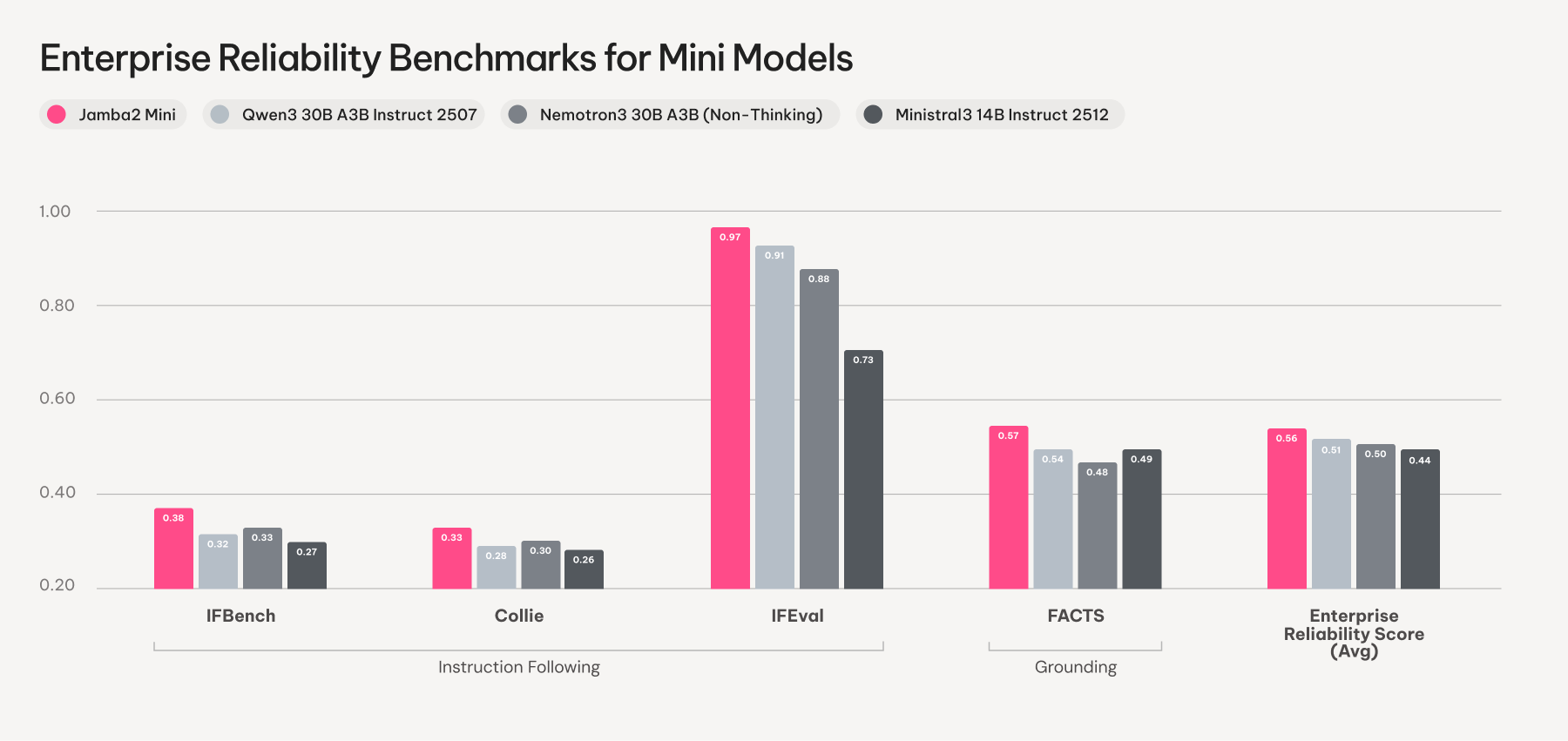
- Category-leading benchmarks: Excels on IFBench, IFEval, Collie, and FACTS
- Statistically significant quality wins: Outperforms comparable models on real-world enterprise tasks
- 256K context window: Processes technical manuals, research papers, and knowledge bases
- Apache 2.0 License: Fully open source for commercial use
- Production-optimized: Lean memory footprint for scalable deployments
Evaluation Results
Jamba2 Mini leads on instruction following and grounding metrics, demonstrating exceptional steerability and context faithfulness. In blind side-by-side evaluations on 100 real-world enterprise prompts, the model achieved statistically significant wins on output quality and factuality compared to Ministral3 14B.
Training and Evaluation Details
Jamba2 models were developed using a comprehensive post-training pipeline starting from Jamba 1.5 pre-training. The models underwent mid-training on 500B carefully curated tokens with increased representation of math, code, high-quality web data, and long documents. A state passing phase optimized the Mamba layers for effective context length generalization. Training continued with cold start supervised fine-tuning to establish instruction-following and reasoning capabilities, followed by DPO optimization.
The final training stages involved multiple on-policy reinforcement learning phases, progressively moving from short-context verifiable rewards to longer context training with mixed verifiable and model-based rewards. Evaluation focused on two key enterprise reliability signals: instruction-following benchmarks measuring steerability, and grounding benchmarks testing context faithfulness. Human evaluators assessed performance on real-world enterprise tasks using blind, counterbalanced side-by-side comparisons, rating outputs on factuality, style, constraint-adherence, instruction-following, and helpfulness.
Quickstart
Run with vLLM
Best results require vLLM version 0.12.0 or higher.
vllm serve "ai21labs/AI21-Jamba2-Mini" --mamba-ssm-cache-dtype float32 --enable-auto-tool-choice --tool-call-parser hermes --enable-prefix-caching --quantization experts_int8
Run with Transformers
pip install transformers>=4.54.0
pip install flash-attn --no-build-isolation
pip install causal-conv1d>=1.2.0
pip install mamba-ssm
import torch
from transformers import AutoModelForCausalLM, AutoTokenizer
model = AutoModelForCausalLM.from_pretrained("ai21labs/AI21-Jamba2-Mini",
dtype=torch.bfloat16,
attn_implementation="flash_attention_2", device_map="auto")
tokenizer = AutoTokenizer.from_pretrained("ai21labs/AI21-Jamba2-Mini")
messages = [
{"role": "system",
"content": "You are an HR Policy Assistant.
Answer employee questions using only the provided policy documents.
If the answer isn't in the documents, say so clearly.
Be concise and cite the specific policy section when possible."
},
{"role": "user",
"content": "Context documents: {retrieved_chunks}.
Employee question: {user_question}.
Answer:"
},
]
prompts = tokenizer.apply_chat_template(messages, add_generation_prompt=True, tokenize=False)
outputs = model.generate(**tokenizer(prompts, return_tensors="pt").to(model.device), do_sample=True, temperature=0.6)
generated_text = tokenizer.decode(outputs[0], skip_special_tokens=True)
print(generated_text)
For more deployment guides and resources, visit our official documentation.
- Downloads last month
- 415
3-bit
4-bit
5-bit
6-bit
8-bit
16-bit
Model tree for llmfan46/AI21-Jamba2-Mini-Ultra-Uncensored-Heretic-GGUF
Base model
ai21labs/AI21-Jamba2-Mini